
Zona: AI Song Maker & Creator
AppVision LTDMusic & Audio
4.51.79K Reviews
- Version
- 7.9.2
- Installs
- 1.00M
- Age Rating
- Everyone
Screenshots
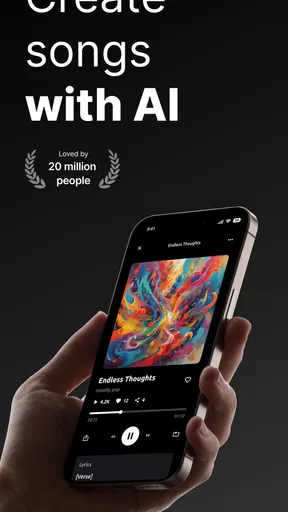
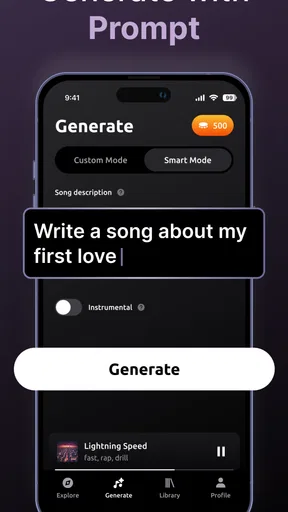
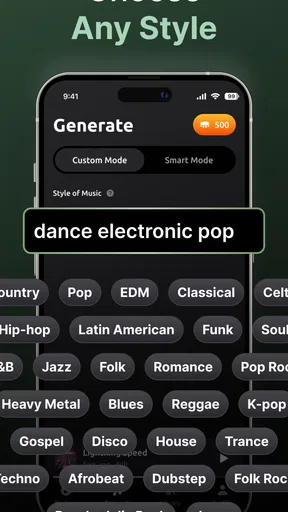
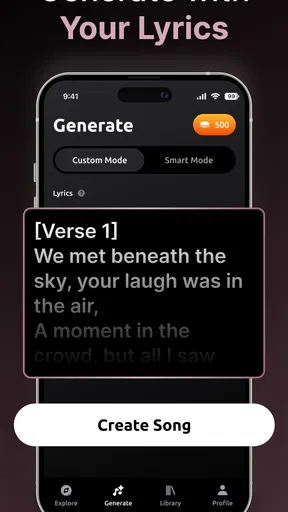
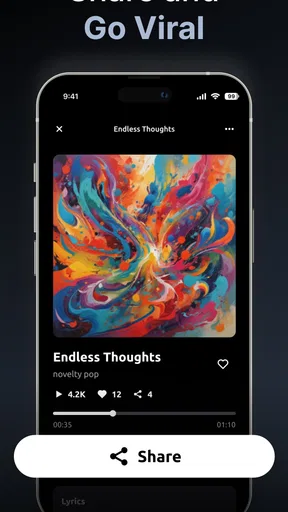
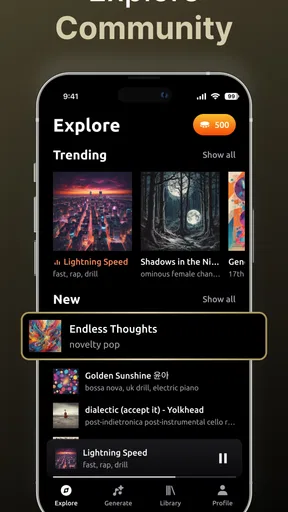
Our Review of Zona: AI Song Maker & Creator
 Analysis by Appyee
I like music apps best when they help me get from a vague idea to something I can actually hear, rather than making me learn a complicated studio before I can begin. Zona: AI Song & Music Maker is aimed at that first creative leap: it gives beginners a way to explore song ideas with AI without requiring a traditional production setup. I’d treat it as a place to sketch and experiment, not as a guaranteed shortcut to a finished, release-ready track.
Turning a passing idea into a starting point
A useful way to approach an AI music maker is to arrive with one clear intention. Instead of asking it to produce “a song” in the broadest sense, decide whether you want a mood, a rough backing idea, a lyric direction, or a vocal concept. That small choice gives your session a purpose and makes it easier to judge whether a result is useful. Zona’s appeal is that it can help you get moving when you have a feeling or theme but not yet a melody or arrangement.
This is especially handy for people who write lyrics, make short videos, or simply enjoy trying musical ideas without playing an instrument. You can use an early result as a creative prompt: keep the part that catches your ear, then make a new attempt with a narrower direction. I wouldn’t assume every generated idea will feel personal, though. AI can offer a starting shape; your choices are what make it feel like yours.
Making a first draft without a studio mindset
The app’s approachable feel matters because music software can be intimidating before you even reach the creative work. Zona is a mobile tool from AppVision LTD in the Music & Audio category, and its stated purpose centers on creating songs, lyrics, and vocals. That combination makes it more relevant to someone exploring a complete song concept than to someone who only wants a basic audio recorder or a simple playlist app.
For a first session, I’d keep the task small: try a single musical direction, listen for what works, and avoid treating the first output as final. A quick draft can be more valuable than an overworked one because it lets you decide whether the idea deserves another pass. If you’re making something for a personal project, a social post, or a playful message to a friend, this low-pressure approach can be enough to turn a blank page into material you can react to.
Choosing a direction and shaping the result
Genre choices can help narrow the feel of a piece, but they also create a trade-off: broad labels are convenient, while the sound you imagine may be more specific than a category can express. I’d use the genre selector as a first steering choice, then listen critically rather than expecting the label alone to deliver a precise style. If the result feels too familiar, changing the prompt or musical direction is more useful than repeatedly accepting a draft that doesn’t fit.
One practical tip is to note what you liked before generating another version. Was it the energy, the vocal feel, the rhythm, or the mood? Keeping that one element in mind makes iteration more deliberate and reduces the temptation to change everything at once. This is a small habit, but it helps you tell whether a new attempt is genuinely closer to your idea or merely different.
When a draft needs another pass
AI-generated material can be convenient, but it may not surprise you every time. Zona’s suggestions can feel repetitive, so I’d use it to explore possibilities rather than expecting endless novelty from repeated generations. When a result misses the mark, a more specific creative brief is a sensible next step; when several tries still feel alike, it may be time to take the idea into a different music tool or work with a musician.
That distinction matters if you already have a strong arrangement in mind. A creator who needs precise control over every note, detailed mixing, or a polished production workflow may find a dedicated digital audio workstation a better fit. Zona is more appealing when speed and approachability matter more than granular control. It can help you discover a direction, but it shouldn’t be mistaken for a full professional studio.
Sharing a piece and handing it off
Sharing a creation can make the process more enjoyable, particularly when you want a friend’s reaction or are making music together informally. I’d treat that as a feedback step: send someone the idea and ask a focused question, such as whether the mood comes across or which version feels more memorable. Specific feedback is easier to use than a general “do you like it?” and can guide your next creative decision.
If your goal is to publish a track, check the available sharing and export options in the app before building your whole workflow around it. A casual share and a final handoff are not the same thing: a finished release may call for more control over editing, audio quality, and delivery than a quick mobile creation tool provides. For a rough demo or a fun concept, a straightforward sharing route may be enough; for a commercial or carefully mastered release, I’d plan on using a more specialized production process.
Who will enjoy it—and who may want another tool
I can see Zona working well for curious beginners, lyric writers looking for musical inspiration, and casual creators who want to test a song concept without first learning a complex production environment. It also suits anyone who enjoys trying alternate moods and styles as part of the creative process. It is less suited to musicians who need exact control of arrangement and sound, or to creators whose main requirement is a reliable, end-to-end release workflow.
Compared with the usual alternatives, it sits between a simple voice memo app and a full desktop-style music workstation. A voice memo is better for capturing a melody you have already sung, while a professional production tool is better for precise editing and mixing. Zona’s value is the guided jump from idea toward a generated musical draft. That middle ground is useful, as long as you choose it for exploration rather than expecting it to replace every tool in a music-making setup.
A realistic way to use it in a busy day
Imagine you have a short lyric in your notes during a lunch break and want to see whether it could become a light, upbeat song. I’d open the app with that goal, choose a broad direction, and listen for a phrase or rhythm worth keeping. Then I’d make one deliberate adjustment based on what felt wrong, rather than spending the whole break cycling through versions. Even if I don’t leave with a finished track, I can come away with a clearer musical direction to revisit later.
That workflow also keeps expectations sensible. A short session is good for finding inspiration, not necessarily for completing every stage of songwriting and production. If the app sparks a promising idea, save or share it using the options available to you, then decide whether to continue in Zona or move to a tool better suited to detailed editing. The useful outcome may be a complete casual creation—or simply the next step in a larger project.
Getting Started with Zona
First things first, let's talk about how easy it is to get started with Zona: AI Song & Music Maker. Downloading and installing the app is a breeze, and before you know it, you're welcomed with a sleek, user-friendly interface. It's intuitive enough that even if you're not a tech whiz, you'll find your way around without breaking a sweat.
Features that Hit the Right Note
Now, what makes Zona stand out? For starters, the app leverages AI technology to help you craft songs effortlessly. You can either start from scratch or use one of the many templates available. The AI assists in generating melodies and rhythms, so you're never stuck staring at a blank screen.
One of my favorite features is the genre selector. Whether you're into pop, rock, hip-hop, or even classical, Zona's got you covered. You can experiment with different styles until you find the one that suits your vibe. And let's not forget about the vast library of instruments. From pianos to synths to guitars, it's like having an entire orchestra at your fingertips.
Making Music Together
Zona also shines in its collaborative features. You can easily share your creations with friends or even work together on a track. It's like having a jam session without needing to be in the same room. Plus, the app allows for seamless integration with other music platforms, so uploading your masterpiece to the world is just a click away.
In Tune with Creativity
As someone who loves to experiment with music, I appreciated the creative freedom Zona offers. The app encourages you to play around with different sounds and effects. You can tweak your compositions to your heart's content, and the real-time feedback is incredibly helpful. It's almost like having a personal music coach guiding you through the process.
Room for Improvement
Of course, no app is perfect, and Zona is no exception. While the AI is generally impressive, there were times when it felt a bit repetitive. A little more variety in the AI-generated suggestions would be a welcome improvement. Additionally, some advanced users might find the lack of certain professional features a bit limiting. However, for most casual creators, this won't be a deal-breaker.
Final Thoughts
In conclusion, Zona: AI Song & Music Maker is a fantastic app for anyone looking to dive into the world of music creation. Whether you're a seasoned musician or a complete beginner, there's something here for everyone. It's fun, easy to use, and offers plenty of options to let your creativity shine. So why not give it a try and see where your musical journey takes you?
Ready to start making some noise? You can download Zona: AI Song & Music Maker from the app store today!
Cost, compatibility, and a sensible first try
Zona is free to install, with optional in-app purchases priced from $2.99 to $74.99 per item, so I’d explore the basic experience before deciding whether any paid option is worthwhile for your needs. Its age rating is Everyone, and it requires Android 7.0 or later. The current version is 7.5.7; I’d keep the app updated through the store on your device so you’re using the version currently offered.
The app has an average rating of 4.5 from around 118,000 ratings, with about 1,700 written reviews and over 1 million installs. Those figures suggest plenty of people have tried it, but they can’t tell you whether its particular creative workflow suits you. My practical recommendation is to begin with a small, low-stakes idea and judge the results by whether they help you move forward—not by whether the first draft sounds like a finished commercial release.
For me, the strongest case for Zona is that it lowers the barrier between imagining a song and hearing a possible version of it. Its weaker case is precision: if you want to control every production decision, you’ll likely outgrow a guided AI tool and prefer software built for detailed editing. I’d recommend trying it if you’re curious, enjoy experimenting, or need a spark for a lyric or casual project. If your priority is polished delivery and dependable control from first note to final master, choose a more specialized production setup instead.
Verdict
Strengths of Zona: AI Song Maker & Creator
- Easy-to-use interface for beginners.
- Wide range of sound effects available.
- AI-enhanced music creation tools.
- Supports multiple audio formats.
- Regular updates with new features.
Limitations of Zona: AI Song Maker & Creator
- Limited free version features.
- Occasional lag on older devices.
- Requires internet for some functions.
- In-app purchases can be pricey.
- Learning curve for advanced features.
Similar Picks in This Category
View All
YouTube Music
Google LLC4.4

Samsung Music
Samsung Electronics Co., Ltd.3.8

Spotify: Music and Podcasts
Spotify AB4.3

JioSaavn - Music & Podcasts
Saavn Media Limited4.3

Lark Player:Music Player & MP3
Lark Player Studio - Music, MP3 & Video Player4.6

StarMaker: Sing Karaoke Songs
SKYWORK AI PTE. LTD.4.3
Frequently Asked Questions
What is Zona: AI Song & Music Maker?
Zona: AI Song & Music Maker is an innovative application that allows users to create music and songs using artificial intelligence. It offers a range of features, including genre selection, lyric generation, and instrumental tracks, making it perfect for both amateur and professional musicians looking to explore new creative avenues.
How does Zona use AI to create music?
Zona utilizes advanced AI algorithms to analyze musical patterns and generate compositions. Users can select from various genres, and the AI will produce music that aligns with those styles. Additionally, it can create lyrics and suggest melodies, offering a comprehensive tool for music creation.
Is Zona suitable for beginners in music creation?
Yes, Zona is designed to be user-friendly for beginners while still offering depth for experienced users. Its intuitive interface guides users through the music creation process, and the AI assistance helps fill in gaps where users might lack expertise, making it accessible for all skill levels.
What are the main features of Zona: AI Song & Music Maker?
Zona offers several key features, including AI-generated lyrics, a variety of instrumental tracks, and the ability to customize and edit compositions. Users can also collaborate with others, export their creations, and even share them on social media directly from the app, enhancing its utility and appeal.
Are there any limitations or downsides to using Zona?
While Zona is a powerful tool, it may not fully replace the creative nuance of human composers. The AI-generated content might require additional editing for personal touch. Additionally, some users might find the premium features locked behind a subscription, which could be a drawback for those on a budget.
